A lab report is only useful if it is real and belongs to the vial in front of you. Edited, borrowed and recycled reports are common in this market, and most buyers never check. The good news: checking takes about five minutes, and you only need the vial, the report and a browser. This guide walks through how to confirm a report directly with the testing laboratory, using the same verification codes printed on Lodge Peptides reports.
- Never trust a report just because it looks professional. Confirm it with the lab that issued it.
- Match three things: the lot number on the vial, the lot on the report, and the lab record.
- Use the verification page on the lab website you find yourself, not a link or QR code supplied by the seller.
- A real lab confirms the same compound, results, date and lot that the seller shows. Any mismatch is a red flag.
Why verification matters
Anyone can make a convincing PDF. Common problems include reports copied from another seller, reports for a different batch, results edited after testing, and reports from labs that do not exist. A certificate of analysis tells you something only when you can tie it to the lot you received and confirm it with the lab.
For the basics of reading the numbers on a report, see how to read a peptide COA.
Step 1: Find the lot number and verification code
Start with the vial. The label should show a lot or batch number. Then find the same lot on the report, along with the identifiers the lab uses to look it up:
- Report number, for example COA-2026-SC-04214
- Verification code or key, for example PTC-6VNBQFR5 or a Janoshik key
- Date tested and the lab name
If the vial has no lot number, or the report has no lab name, date or verification code, you cannot verify it. Treat that as a warning in itself.
Step 2: Go to the lab website yourself
Search for the lab by name and open its official site directly. Do not rely on a link, QR code or screenshot sent by the seller, because a fake report can point to a fake verification page. Most third-party peptide labs have a verification or lookup page. For example, Peptide Test Canada uses peptidetestcanada.ca/verify and Janoshik Analytical has a verify page on janoshik.com.
Step 3: Enter the code and compare every detail
Enter the report number or verification key. The lab result should match the report you were given on every point:
- The compound named
- The purity and content results
- The lot or sample ID
- The test date
- The method, such as HPLC or LC-MS
A genuine report matches exactly. Small differences, such as a changed purity figure or a different lot, mean the copy you have was altered or belongs to something else.
A real example: our Tirzepatide 10 mg lot
Here is the check done on one of our own vials, so you can see what a clean match looks like.
The vial label reads lot ZB-TZ201126. The PDF report for that lot, issued by Peptide Test Canada (testing done by SideChain Analytics), lists report COA-2026-SC-04214 with verification code PTC-6VNBQFR5, received 16 October 2026 and analysed 26 October 2026.
On peptidetestcanada.ca/verify, entering that code should bring back the same record: tirzepatide, lot ZB-TZ201126, chromatographic purity 99.5% and net peptide content 10.56 mg against a 10 mg label, which works out to a fill accuracy of 105.6%. If even one of those numbers came back different, the PDF would not be trustworthy, no matter how official it looked.
We entered code PTC-6VNBQFR5 on the Peptide Test Canada verification page. The lab’s site returned “Certificate verified: this is an authentic Peptide Test Canada Certificate of Analysis,” issued October 27, 2026. Open the lab’s result yourself, or type the code in on their site directly.
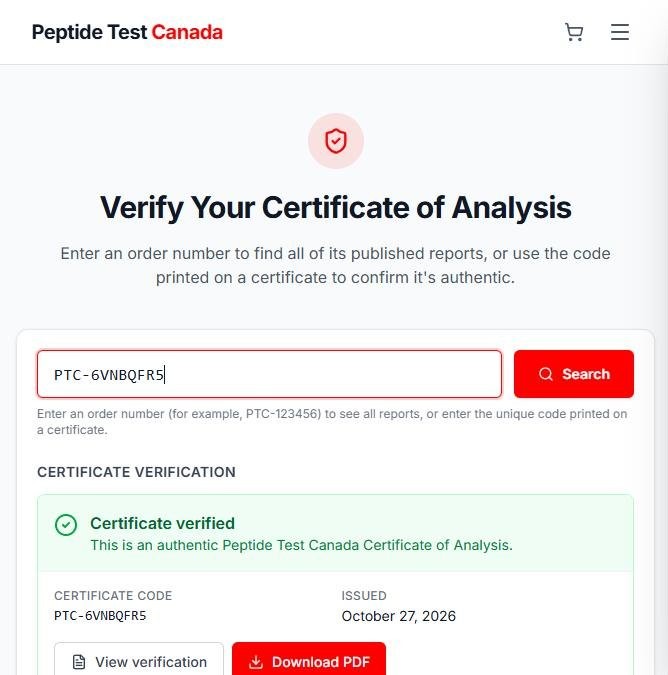
One detail worth noticing: the report shows the content above the label claim. That is normal, as fill is rarely exact, and it is a good sign the number was not tidied up to look perfect.
Lab by lab: exactly how to check
Each lab runs its own verification system. These are the ones Canadian buyers see most often, with the exact steps. Always type the lab’s address yourself rather than following a link or QR code from the seller.
Peptide Test Canada
- Go to peptidetestcanada.ca/verify.
- Enter the certificate code printed on the report. It starts with PTC-, for example PTC-6VNBQFR5.
- A genuine report shows “Certificate verified” with the issue date, plus a link to the full certificate. Compare the compound, lot, purity and content with the PDF you were given.
Testides
- Go to testides.com/verify.
- Enter the full report number exactly as printed on the certificate.
- Accept the terms of use to see the results. A genuine number shows “Valid report issued by Testides” with the compound, purity, amount measured and dates. A made-up number shows “Report not verified”.
- For reports issued from September 2026 you can go further: upload the seller’s PDF and Testides compares its digital fingerprint (SHA-256) with the original. Any edit, even re-saving the file, makes it fail.
Janoshik
- Go to janoshik.com/verification.
- Enter two values from the report: the task number (top left of the report) and the unique key (bottom of the report).
- A genuine report shows “This test is in our database” with a button to open the original. Open it and compare every figure with the copy you were given.
Is the lab itself real?
Verification only proves that a lab’s website has a record. If the lab is not genuine, its records are not either. A few quick checks:
- The verification address matches the lab. A report that sends you to a slightly different domain from the lab’s own site is a warning sign.
- Fake numbers fail. Try a made-up code. A real system says the report does not exist; a fake one may show results for anything.
- The lab is older than its reports. A lab claiming thousands of past reports on a website registered a few weeks ago deserves scrutiny.
- Other people use it. Established labs are named in reports from many unrelated sellers and in community discussions, not just one shop.
Red flags
- The verification page is on a different or unusual domain from the lab main site.
- The report has no lot number, or the lot does not match your vial.
- The same report appears on several sellers for different products.
- The chromatogram is missing, or the report shows purity with no identity result.
- The seller cannot or will not give you a verification code.
- The lab cannot be found online, or has no way to contact it.
How this works at Lodge Peptides
Every tested Lodge Peptides lot has a third-party report from Peptide Test Canada, with the lot number, report number and verification code shown on the product page and in our COA library. Each vial label also carries a QR code that opens the report for that lot, or its product page while testing is under way. You are still welcome to verify any of our reports on the lab site directly, which is exactly what we recommend.
Two labs, two numbers? Why results differ between labs, and how much difference is normal, is explained in why two labs give different results for the same peptide.
Frequently asked questions
What is a peptide lab report verification code?
It is a unique code or key issued by the testing lab for a specific report. Entering it on the lab website pulls up the original result, so you can confirm the report you were given has not been changed.
Can a seller fake a verification link?
Yes. A fake report can include a link or QR code that leads to a look-alike page. Always find the lab website yourself and enter the code there.
What if the lab result does not match the report?
Treat the report as unreliable. Contact the seller with the lab result, and do not rely on that report for the lot in question.
Do all Lodge Peptides products have verifiable reports?
Every tested Lodge Peptides lot has a third-party report with a lot number and verification code, listed on its product page and in the COA library. Products still in for testing are marked on their product page.
See all of our current results compared in the lab results roundup.
How do I verify a Janoshik report?
Go to janoshik.com/verification and enter both the task number from the top of the report and the unique key from the bottom. A genuine report shows “This test is in our database” and lets you open the original to compare.
How do I verify a Testides report?
Go to testides.com/verify, enter the full report number and accept the terms of use. A genuine report shows “Valid report issued by Testides”. For newer certificates you can also upload the PDF to check it has not been edited.
How can I tell if a testing lab is real?
Check that the verification site is on the lab’s own domain, that a made-up code is rejected, that the lab’s website is older than the reports it issues, and that other independent sellers and buyers use the same lab.
Sources and further reading
- Peptide Test Canada: report verification
- Janoshik Analytical: report verification
- Certificate of analysis (overview)
Products sold by Lodge Peptides are intended for laboratory research use only and are not for human or animal consumption. This article is general educational information, not medical or legal advice.
Email list
Get lot reports and guides in your inbox
New lot reports, research guides, restocks, and occasional offers from the Lodge Peptides team.